What is a Temporal Retry Policy?
A Retry Policy works in cooperation with the timeouts to provide fine controls to optimize the execution experience.
A Retry Policy is a collection of attributes that instructs the Temporal Server how to retry a failure of a Workflow Execution or an Activity Task Execution. Note that Retry Policies do not apply to Workflow Task Executions, which retry until the Workflow Execution Timeout (which is unlimited by default) with an exponential backoff and a max interval of 10 minutes.
Try out the Activity retry simulator to visiualize how a Retry Policy works.
 Set a custom Retry Policy for an Activity in Gofeature-guide
 Set a custom Retry Policy for an Activity in Javafeature-guide
 Set a custom Retry Policy for an Activity in PHPfeature-guide
 Set a custom Retry Policy for an Activity in Pythonfeature-guide
- Set a Retry Policy for a Workflow in Gofeature-guide
- Set a Retry Policy for a Workflow in Javafeature-guide
- Set a Retry Policy for a Workflow in PHPfeature-guide
- Set a Retry Policy for a Workflow in Pythonfeature-guide
 Set a Retry Policy for a Workflow in TypeScriptfeature-guide
Default behavior
Activities in Temporal are associated with a Retry Policy by default, while Workflows are not. The Temporal SDK provides a Retry Policy instance with default behavior. While this object is not specific to either a Workflow or Activity, you'll use different methods to apply it to the execution of each.
This section details the default retry behavior for both Activities and Workflows to provide context for any further customization.
Activity Execution
Temporal's default behavior is to automatically retry an Activity, with a short delay between each attempt that increases exponentially, until it either succeeds or is canceled. When a subsequent request succeeds, your Workflow code will resume as if the failure never occurred.
When an Activity Task Execution is retried, the Temporal Service places a new Activity Task into its respective Activity Task Queue, which results in a new Activity Task Execution.
The default Retry Policy uses exponential backoff with a 2.0 backoff coefficient, starting with a 1-second initial interval and capping at a maximum interval of 100 seconds. By default, the maximum attempt of retries are set to zero which is evaluated as unlimited and non-retryable errors default to none. For detailed information about all Retry Policy attributes and their default values, see the Properties section.
Workflow Execution
Unlike Activities, Workflow Executions do not retry by default. When a Workflow Execution is spawned, it is not associated with a default Retry Policy and thus does not retry by default.
Temporal provides guidance around idempotence of Activity code with the expectation that Activities will need to re-execute upon failure; this is not typically true of Workflows. In most use cases, a Workflow failure would indicate an issue with the design or deployment of your application; for example, a permanent failure that may require different input data.
Retrying an entire Workflow Execution is not recommended due to Temporal's deterministic design. Since Workflows replay the same sequence of events to reach the same state, retrying the whole workflow would repeat the same logic without resolving the underlying issue that caused the failure. This repetition does not address problems related to external dependencies or unchanged conditions and can lead to unnecessary resource consumption and higher costs. Instead, it's more efficient to retry only the failed Activities. This approach targets specific points of failure, allowing the workflow to progress without redundant operations, thereby saving on resources and ensuring a more focused and effective error recovery process. If you need to retry parts of your Workflow Definition, we recommend you implement this in your Workflow code.
Custom Retry Policy
To use a custom Retry Policy, provide it as an options parameter when starting a Workflow Execution or Activity Execution. Only certain scenarios merit starting a Workflow Execution with a custom Retry Policy, such as the following:
- A Temporal Cron Job or some other stateless, always-running Workflow Execution that can benefit from retries.
- A file-processing or media-encoding Workflow Execution that downloads files to a host.
Properties
Default values for Retry Policy
Initial Interval     = 1 second
Backoff Coefficient  = 2.0
Maximum Interval     = 100 × Initial Interval
Maximum Attempts     = ∞
Non-Retryable Errors = []
Initial Interval
- Description: Amount of time that must elapse before the first retry occurs.
- The default value is 1 second.
- Use case: This is used as the base interval time for the Backoff Coefficient to multiply against.
Backoff Coefficient
- Description: The value dictates how much the retry interval increases.
- The default value is 2.0.
- A backoff coefficient of 1.0 means that the retry interval always equals the Initial Interval.
- Use case: Use this attribute to increase the interval between retries. By having a backoff coefficient greater than 1.0, the first few retries happen relatively quickly to overcome intermittent failures, but subsequent retries happen farther and farther apart to account for longer outages. Use the Maximum Interval attribute to prevent the coefficient from increasing the retry interval too much.
Maximum Interval
- Description: Specifies the maximum interval between retries.
- The default value is 100 times the Initial Interval.
- Use case: This attribute is useful for Backoff Coefficients that are greater than 1.0 because it prevents the retry interval from growing infinitely.
Maximum Attempts
- Description: Specifies the maximum number of execution attempts that can be made in the presence of failures.
- The default is unlimited.
- If this limit is exceeded, the execution fails without retrying again. When this happens an error is returned.
- Setting the value to 0 also means unlimited.
- Setting the value to 1 means a single execution attempt and no retries.
- Setting the value to a negative integer results in an error when the execution is invoked.
- Use case: Use this attribute to ensure that retries do not continue indefinitely. In most cases, we recommend using the Workflow Execution Timeout for Workflows or the Schedule-To-Close Timeout for Activities to limit the total duration of retries, rather than using this attribute.
Non-Retryable Errors
- Description: Specifies errors that shouldn't be retried.
- Default is none.
- Errors are matched against the
typefield of the Application Failure. - If one of those errors occurs, a retry does not occur.
- Use case: If you know of errors that should not trigger a retry, you can specify that, if they occur, the execution is not retried.
Retry interval
The wait time before a retry is the retry interval. A retry interval is the smaller of two values:
- The Initial Interval multiplied by the Backoff Coefficient raised to the power of the number of retries.
- The Maximum Interval.
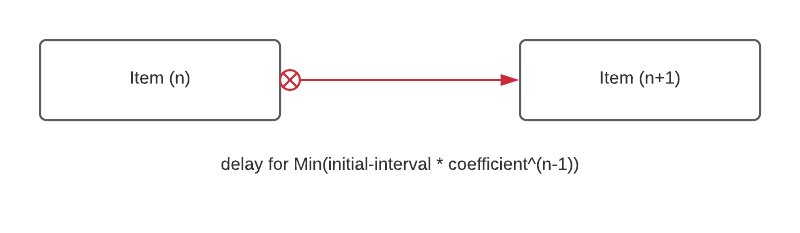
Diagram that shows the retry interval and its formula
Per-error next Retry delay
Sometimes, your Activity or Workflow raises a special exception that needs a different retry interval from the Retry Policy. To accomplish this, you may throw an Application Failure with the next Retry delay field set. This value will replace and override whatever the retry interval would be on the Retry Policy. Note that your retries will still cap out under the Retry Policy's Maximum Attempts, as well as overall timeouts. For an Activity, its Schedule-to-Close Timeout applies. For a Workflow, the Execution Timeout applies.
- Customize retry delays per error in the Java SDK.feature-guide
Event History
There are some subtle nuances to how Events are recorded to an Event History when a Retry Policy comes into play.
-
For an Activity Execution, the ActivityTaskStarted Event will not show up in the Workflow Execution Event History until the Activity Execution has completed or failed (having exhausted all retries). This is to avoid filling the Event History with noise. Use the Describe API to get a pending Activity Execution's attempt count.
-
For a Workflow Execution with a Retry Policy, if the Workflow Execution fails, the Workflow Execution will Continue-As-New and the associated Event is written to the Event History. The WorkflowExecutionContinuedAsNew Event will have an "initiator" field that will specify the Retry Policy as the value and the new Run Id for the next retry attempt. The new Workflow Execution is created immediately. But the first Workflow Task won't be scheduled until the backoff duration is exhausted. That duration is recorded as the
firstWorkflowTaskBackofffield of the new run'sWorkflowExecutionStartedEventAttributesevent.